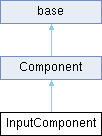
输入交互组件
更多...
#include <InputComponent.h>
|
| void | SetMapping (std::string mappingName, int value) |
| | 设置键值和名字的映射.
|
| |
| virtual void | BeginPlay () |
| | 设置纯虚函数,把不能写在构造却需要优先实现的写在这.
|
| |
| template<typename T > |
| void | BindAction (std::string ActionName, InputType type, T *obj, void(T::*func)()) |
| | 绑定函数和键值.
|
| |
| template<typename T > |
| void | BindAction (std::string ActionName, int value, InputType type, T *obj, void(T::*func)()) |
| | 绑定函数和键值,
|
| |
| void | BindAction (std::string ActionName, InputType type, std::function< void()>func) |
| | 绑定按键事件映射.
|
| |
| void | PeekInfo () |
| | action.
|
| |
| void | PeekInfo_ () |
| | 轴处理.
|
| |
| void | MouseTick () |
| | 获取鼠标在绘图窗口坐标.
|
| |
| virtual void | Update (float deltaTime) override |
| |
| virtual void | EndPlay () |
| | 把一些不能写在析构函数的一些操作写在这里
|
| |
| void | SetOwner (class Object *owner) |
| | 设置绑定对象.
|
| |
| virtual void | Destruct () |
| | 解除物体绑定组件,并销毁组件
|
| |
| virtual void | Activate () |
| | 激活组件
|
| |
| virtual void | Deactivate () |
| | 停用组件
|
| |
| Object * | GetOwner () const |
| | 获取绑定对象指针
|
| |
| | base () |
| |
| virtual | ~base () |
| |
| std::string | GetName () const |
| |
| void | SetName (const std::string &name) |
| |
◆ BeginPlay()
| virtual void InputComponent::BeginPlay |
( |
| ) |
|
|
inlinevirtual |
◆ BindAction() [1/3]
| void InputComponent::BindAction |
( |
std::string | ActionName, |
|
|
InputType | type, |
|
|
std::function< void()> | func ) |
绑定按键事件映射.
- 参数
-
| [in] | ActionName | 键名 |
| [in] | type | 按键信号类型 |
| [in] | func | lambda函数 |
◆ BindAction() [2/3]
template<typename T >
| void InputComponent::BindAction |
( |
std::string | ActionName, |
|
|
InputType | type, |
|
|
T * | obj, |
|
|
void(T::* | func )() ) |
|
inline |
绑定函数和键值.
- 参数
-
| [in] | ActionName | 键名 |
| [in] | type | 按键信号类型 |
| [in] | obj | 类对象 |
| [in] | func | 成员函数 |
◆ BindAction() [3/3]
template<typename T >
| void InputComponent::BindAction |
( |
std::string | ActionName, |
|
|
int | value, |
|
|
InputType | type, |
|
|
T * | obj, |
|
|
void(T::* | func )() ) |
|
inline |
绑定函数和键值,
- 参数
-
| [in] | ActionName | 键名 |
| [in] | value | 虚拟键值 |
| [in] | type | 按键信号类型 |
| [in] | obj | 类对象 |
| [in] | func | 成员函数 |
◆ EnableInput()
| void InputComponent::EnableInput |
( |
bool | enable | ) |
|
|
static |
◆ GetMousePosition()
| Vector2D InputComponent::GetMousePosition |
( |
| ) |
|
|
static |
获取鼠标屏幕坐标 相对于画布位置.
- 返回
- 相对于(0,0)点
◆ IsMouseButtonClick()
| bool InputComponent::IsMouseButtonClick |
( |
| ) |
|
|
static |
◆ MouseTick()
| void InputComponent::MouseTick |
( |
| ) |
|
◆ PeekInfo()
| void InputComponent::PeekInfo |
( |
| ) |
|
◆ PeekInfo_()
| void InputComponent::PeekInfo_ |
( |
| ) |
|
◆ SetMapping()
| void InputComponent::SetMapping |
( |
std::string | mappingName, |
|
|
int | value ) |
设置键值和名字的映射.
- 参数
-
| [in] | mappingName | 键名 |
| [in] | value | 虚拟值 |
◆ Update()
| void InputComponent::Update |
( |
float | deltaTime | ) |
|
|
overridevirtual |
◆ actionCallbacks
| std::map<std::string, KeyBindInfo> InputComponent::actionCallbacks |
|
private |
◆ bActive
| bool InputComponent::bActive = true |
|
staticprivate |
◆ mappings
| std::map<std::string, int> InputComponent::mappings |
|
private |
◆ mousePos
◆ msg
| ExMessage InputComponent::msg |
|
private |

 Public 成员函数 继承自 Component
 1.12.0