 |
easyx_framework V1.0.0
基于easyx的c++游戏框架
|

|
|
easyx_framework V1.0.0
基于easyx的c++游戏框架
|
|
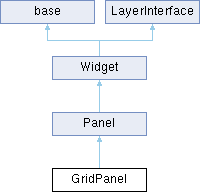
网格面板. 更多...
#include <widgets.h>
Public 成员函数 | |
| void | SetRow (int row) |
| 设置行数. | |
| void | SetCol (int col) |
| 设置列数. | |
| void | SetSpacing (Vector2D spacing) |
| 设置成员间隙大小. | |
| void | SetSpacing (float x, float y) |
| 设置成员间隙大小. | |
| Vector2D | GetSize () const override |
| 获取实际大小 | |
 Public 成员函数 继承自 Panel Public 成员函数 继承自 Panel | |
| Panel () | |
| ~Panel () | |
| 析构函数 | |
| virtual void | Update () override |
| 更新绑定成员位置 | |
| void | SetUnitSize (Vector2D size) |
| 设置标准容器部件大小. | |
| void | AddMember (Widget *member, int32 index=-1) |
| 加入Widget的对象. | |
| void | Remove (Widget *member) |
| 从panel中移除部件对象. | |
| void | AddMember (UserInterface *member, int32 index=-1) |
| 加入widget和ui的对象 index是members的下标 . | |
| void | Remove (UserInterface *member) |
| 从panel中移除UI对象. | |
| Public 成员函数 继承自 Widget | |
| Widget () | |
| virtual | ~Widget () |
| 析构函数 从mainworld容器区域中删去类 | |
| virtual void | BeginPlay () |
| virtual void | EndPlay () |
| virtual void | Render () |
| 纯虚函数,继承的类都有它来实现渲染,world默认遍历函数实现渲染 | |
| void | ShowInfoBox () |
| 显示提示框 | |
| void | DrawDebugRect () |
| 绘制部件的边框 | |
| void | SetLayoutPattern (LayoutPattern pattern) |
| 设置布局形式 | |
| void | SetUiPattern (UiPattern pattern) |
| 设置部件可视性 | |
| void | SetPosPattern (LayoutPositionPattern pattern) |
| 设置坐标系 | |
| LayoutPattern | GetLayoutPattern () const |
| 获取布局形式 | |
| UiPattern | GetUiPattern () const |
| 获取部件可视性 | |
| LayoutPositionPattern | GetPosPattern () const |
| 获取坐标系 | |
| void | EnableInfoBox (bool showinfo) |
| 是否开启提示框 | |
| void | SetInfoText (std::string text) |
| 设置提示框内容 | |
| void | SetSize (Vector2D size) |
| void | AttachTo (Widget *par) |
| 实现基础小部件的绑定 | |
| void | DetachFrom (Widget *par) |
| 解除基础小部件的绑定 | |
| Vector2D | GetScreenPosition () const |
| 获取相对屏幕绝对坐标 | |
| float | GetScreenRotation () const |
| 获取相对屏幕坐标系的角度 | |
| Vector2D | GetScreenScale () const |
| 获取绝对放缩比例 | |
| Vector2D | GetRelativePosition () const |
| 获取小部件相对位置 | |
| float | GetRelativeRotation () const |
| 获取小部件相对角度 | |
| Vector2D | GetRelativeScale () const |
| 获取小部件相对放缩比例 | |
| void | SetRelativePosition (Vector2D pos) |
| 设置相对坐标 | |
| void | SetRelativeRotation (float rotation) |
| 设置相对角度 | |
| void | SetRelativeScale (Vector2D scale) |
| 设置小部件相对放缩比例 | |
| Public 成员函数 继承自 base | |
| base () | |
| virtual | ~base () |
| std::string | GetName () const |
| void | SetName (const std::string &name) |
| virtual void | Update (float deltaTime) |
| Public 成员函数 继承自 LayerInterface | |
| LayerInterface () | |
| 构造图层顺序接口 | |
| ~LayerInterface () | |
| 析构图层顺序接口,从world图层顺序容器中删去这个类 | |
| void | SetLayer (int _layer) |
| 设置图层层级 要实现必须先把排好序的容器中删除已经排好序的对象,重新插入已经改变好的对象 | |
| int | GetLayer () const |
| 获取图层层级 | |
Private 成员函数 | |
| void | AdjustMemberPosition (Widget *member, int32 index) |
| 行列排列更新坐标 | |
Private 属性 | |
| bool | priority = false |
| 优先级 默认false是列优先,true是行优先 | |
| float | spacingx = 0 |
| 成员水平距离 | |
| float | spacingy = 0 |
| 成员垂直距离 | |
| int | row = 0 |
| 总行数 是否有影响要看优先级 | |
| int | column =0 |
| 总列数 是否有影响要看优先级 | |
额外继承的成员函数 | |
| Protected 成员函数 继承自 Panel | |
| Protected 成员函数 继承自 Widget | |
| bool | isUnderCursor () const |
| 鼠标是否在点击的状态 | |
| Protected 属性 继承自 Panel | |
| std::vector< Widget * > | members |
| 存储部件 | |
| std::vector< UserInterface * > | members_ui |
| 本质是容纳画布根部件 一个整体 | |
| Vector2D | UnitSize |
| 单个存储部件大小 | |
| Protected 属性 继承自 Widget | |
| Transform | transform |
| 场景属性 | |
| Widget * | parent = nullptr |
| 父节点 | |
| std::unordered_set< Widget * > | children |
| 孩子容器 | |
| Panel * | attachedPanel = nullptr |
| 附着的容器面板 | |
| Vector2D | size = {1,1} |
| 大小 | |
| LayoutPattern | layoutpattern |
| 布局形式 | |
| UiPattern | uipattern |
| 部件可视性 | |
| LayoutPositionPattern | pospattern =LayoutPositionPattern::Center |
| 坐标系 | |
| Characters | InfoText |
| 提示框 | |
| bool | bInfoBox = false |
| 是否开启文本显示 | |
网格面板.
按照下标按照网格行列排列成员 自适应
行列排列更新坐标
实现了 Panel.
|
inline |
设置列数.
| [in] | col | 列数 |
|
inline |
设置行数.
| [in] | row | 行数 |
|
inline |
设置成员间隙大小.
| [in] | x | 行成员间距 |
| [in] | y | 列成员间距 |
|
inline |
设置成员间隙大小.
| [in] | spacing | 间隔大小 |
|
private |
总列数 是否有影响要看优先级
|
private |
优先级 默认false是列优先,true是行优先
|
private |
总行数 是否有影响要看优先级
|
private |
成员水平距离
|
private |
成员垂直距离
 1.12.0