 |
easyx_framework V1.0.0
基于easyx的c++游戏框架
|

|
|
easyx_framework V1.0.0
基于easyx的c++游戏框架
|
|
按钮委托(多播没有参数) 更多...
#include <widgets.h>
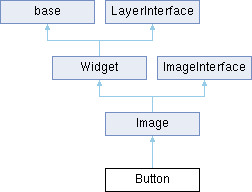
Public 成员函数 | |
| void | Update () override |
| 实现功能 | |
| void | LoadNormalPicture (std::string name) |
| 加载普通图片. | |
| void | LoadHoverPicture (std::string name) |
| 加载悬停的时候的图片. | |
| void | LoadPressedPicture (std::string name) |
| 加载鼠标按下之后的图片. | |
| bool | IsMousePressed () |
| 是否点击了鼠标. | |
 Public 成员函数 继承自 Image Public 成员函数 继承自 Image | |
| void | Update () override |
| 插入世界容器中进行一些交互处理 每一帧gengxin | |
| void | Render () override |
| 纯虚函数,继承的类都有它来实现渲染,world默认遍历函数实现渲染 | |
| bool | IsMouseOn () |
| 判断鼠标是否在图片上 | |
| Public 成员函数 继承自 Widget | |
| Widget () | |
| virtual | ~Widget () |
| 析构函数 从mainworld容器区域中删去类 | |
| virtual void | BeginPlay () |
| virtual void | EndPlay () |
| void | ShowInfoBox () |
| 显示提示框 | |
| void | DrawDebugRect () |
| 绘制部件的边框 | |
| void | SetLayoutPattern (LayoutPattern pattern) |
| 设置布局形式 | |
| void | SetUiPattern (UiPattern pattern) |
| 设置部件可视性 | |
| void | SetPosPattern (LayoutPositionPattern pattern) |
| 设置坐标系 | |
| LayoutPattern | GetLayoutPattern () const |
| 获取布局形式 | |
| UiPattern | GetUiPattern () const |
| 获取部件可视性 | |
| LayoutPositionPattern | GetPosPattern () const |
| 获取坐标系 | |
| void | EnableInfoBox (bool showinfo) |
| 是否开启提示框 | |
| void | SetInfoText (std::string text) |
| 设置提示框内容 | |
| virtual Vector2D | GetSize () const |
| 获取实际大小 | |
| void | SetSize (Vector2D size) |
| void | AttachTo (Widget *par) |
| 实现基础小部件的绑定 | |
| void | DetachFrom (Widget *par) |
| 解除基础小部件的绑定 | |
| Vector2D | GetScreenPosition () const |
| 获取相对屏幕绝对坐标 | |
| float | GetScreenRotation () const |
| 获取相对屏幕坐标系的角度 | |
| Vector2D | GetScreenScale () const |
| 获取绝对放缩比例 | |
| Vector2D | GetRelativePosition () const |
| 获取小部件相对位置 | |
| float | GetRelativeRotation () const |
| 获取小部件相对角度 | |
| Vector2D | GetRelativeScale () const |
| 获取小部件相对放缩比例 | |
| void | SetRelativePosition (Vector2D pos) |
| 设置相对坐标 | |
| void | SetRelativeRotation (float rotation) |
| 设置相对角度 | |
| void | SetRelativeScale (Vector2D scale) |
| 设置小部件相对放缩比例 | |
| Public 成员函数 继承自 base | |
| base () | |
| virtual | ~base () |
| std::string | GetName () const |
| void | SetName (const std::string &name) |
| virtual void | Update (float deltaTime) |
| Public 成员函数 继承自 LayerInterface | |
| LayerInterface () | |
| 构造图层顺序接口 | |
| ~LayerInterface () | |
| 析构图层顺序接口,从world图层顺序容器中删去这个类 | |
| void | SetLayer (int _layer) |
| 设置图层层级 要实现必须先把排好序的容器中删除已经排好序的对象,重新插入已经改变好的对象 | |
| int | GetLayer () const |
| 获取图层层级 | |
| Public 成员函数 继承自 ImageInterface | |
| ~ImageInterface () | |
| 析构函数 释放所有开辟的图像句柄资源 | |
| BYTE | GetTransparency () const |
| 获取透明度 | |
| void | SetTransparency (BYTE transparency) |
| 设置透明度 | |
| bool | IsWave () |
| 是否已经开启了波幅 | |
| void | SetFilter (bool enable, COLORREF col=BLACK, int level=100) |
| 开启设置滤镜 会清空之前所有滤镜 | |
| void | AddFilter (FilterInfo filterInfo) |
| 添加滤镜 | |
| void | AddFilter (bool enable=true, COLORREF col=BLACK, int level=100, int layer=1) |
| 在滤镜上面继续添加滤镜 如果不写层级就会替换第一层 | |
| void | RemoveFilter () |
| 移除层级5滤镜 | |
| void | RemoveFilter (int layer) |
| 移除滤镜 | |
| void | EnableFilter () |
| 开关整体滤镜 | |
| void | EnableFilLayer (int layer) |
| 开关图层滤镜 | |
| void | ExitWave () |
| 关闭波幅 | |
| void | MeanBlur (unsigned level) |
| 均值模糊(建议在Gameplay开始前预处理使用) | |
| void | WaveFrom (int x, int y, int stonesize, int stoneweight) |
| 波纹 | |
| void | LoadSprite (std::string name) |
| 加载静态图像. | |
| void | SetStartAndEndLoc (Pair start, Pair end) |
| 截取非动画资源指定部分. | |
Public 属性 | |
| ButtonDelegate | OnMousePressedBegin |
| 鼠标按下去的开始事件 | |
| ButtonDelegate | OnMousePressedEnd |
| 鼠标按下去的结束事件 | |
| ButtonDelegate | OnMouseHoverBegin |
| 鼠标悬停的开始事件 | |
| ButtonDelegate | OnMouseHoverEnd |
| 鼠标悬停的结束事件 | |
Private 属性 | |
| IMAGE * | normal |
| 正常显示的图像 | |
| IMAGE * | hover |
| 正常悬停的图片 | |
| IMAGE * | pressed |
| 按下之后的图像 | |
| bool | isPressed =false |
| 是否处于按下状态 | |
| bool | ishover = true |
| 是否处于悬停状态 | |
额外继承的成员函数 | |
| Protected 成员函数 继承自 Widget | |
| bool | isUnderCursor () const |
| 鼠标是否在点击的状态 | |
| Protected 成员函数 继承自 ImageInterface | |
| void | RotateImage (double radian) |
| 旋转照片 | |
| void | FilterImage () |
| 给图片施加滤镜 滤镜实现 | |
| Protected 属性 继承自 Widget | |
| Transform | transform |
| 场景属性 | |
| Widget * | parent = nullptr |
| 父节点 | |
| std::unordered_set< Widget * > | children |
| 孩子容器 | |
| Panel * | attachedPanel = nullptr |
| 附着的容器面板 | |
| Vector2D | size = {1,1} |
| 大小 | |
| LayoutPattern | layoutpattern |
| 布局形式 | |
| UiPattern | uipattern |
| 部件可视性 | |
| LayoutPositionPattern | pospattern =LayoutPositionPattern::Center |
| 坐标系 | |
| Characters | InfoText |
| 提示框 | |
| bool | bInfoBox = false |
| 是否开启文本显示 | |
| Protected 属性 继承自 ImageInterface | |
| IMAGE * | sprite = nullptr |
| 存储指针节省空间 用来指向我们当前需要的从资源库查找到的地址 | |
| struct ImageInterface::SpriteInfo | spriteinfo |
| BYTE | alpha = 255 |
| 设置透明度 | |
| float | angle = 0 |
| 逆时针旋转角度 | |
| IMAGE * | copy = nullptr |
| 旋转图像句柄 | |
| IMAGE * | filter = nullptr |
| 滤镜图像句柄 | |
| bool | bFilterEnable = false |
| 滤镜开关 | |
| std::set< FilterInfo, FilterSort > | FilterLayer |
| 滤镜层级容器 按照指定层级来排序滤镜 | |
| IMAGE * | blur {} |
| 滤波之后的句柄 | |
| IMAGE * | wave {} |
| 波幅句柄 | |
| bool | bIsWave =false |
| 是否开启波幅 | |
按钮委托(多播没有参数)
按钮部件.
| bool Button::IsMousePressed | ( | ) |
是否点击了鼠标.
| void Button::LoadHoverPicture | ( | std::string | name | ) |
加载悬停的时候的图片.
| [in] | name | 图像名字 |
| void Button::LoadNormalPicture | ( | std::string | name | ) |
加载普通图片.
| [in] | name | 图像名字 |
| void Button::LoadPressedPicture | ( | std::string | name | ) |
加载鼠标按下之后的图片.
| [in] | name | 图像名字 |
|
overridevirtual |
实现功能
重载 Widget .
|
private |
正常悬停的图片
|
private |
是否处于悬停状态
|
private |
是否处于按下状态
|
private |
正常显示的图像
| ButtonDelegate Button::OnMouseHoverBegin |
鼠标悬停的开始事件
| ButtonDelegate Button::OnMouseHoverEnd |
鼠标悬停的结束事件
| ButtonDelegate Button::OnMousePressedBegin |
鼠标按下去的开始事件
| ButtonDelegate Button::OnMousePressedEnd |
鼠标按下去的结束事件
|
private |
按下之后的图像
 1.12.0